Master Presentations with Graftel Google Slides
Creating a professional presentation often feels like a race against the clock. Whether you are pitching a new business idea, teaching a class, or sharing a personal project update, the pressure to make your slides look polished can be overwhelming. This is where Graftel - Google Slide Template steps in as a practical solution for anyone who values both aesthetics and efficiency. Instead of starting from a blank white screen, this resource provides a robust foundation that allows you to focus on your message rather than fighting with design tools.
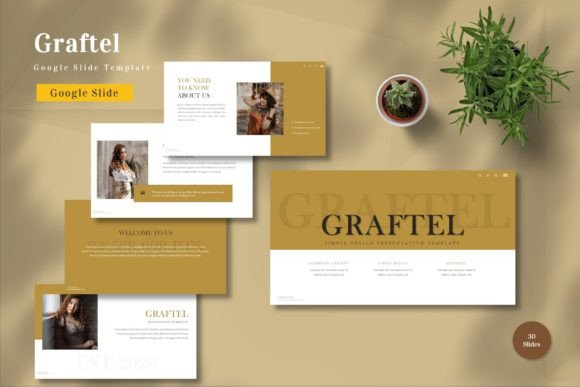
The core appeal of this template lies in its versatility. It is designed to meet all business and personal needs, making it an ideal choice for entrepreneurs, marketers, educators, and freelancers alike. The philosophy behind Graftel is simple: every element should be editable. You can input your content, replace placeholder images with your own visuals, change colors to match your brand identity, and utilize animated slides to keep your audience engaged. This level of customization ensures that your final output feels unique to you, not just another generic download.
Why Design Flexibility Matters
One of the most significant advantages of using Graftel - Google Slide Template is the sheer volume of options available without the clutter. With 150 total slides spread across five premade color schemes, you have a vast library to draw from. However, quantity means little if the quality isn't there. That is why the template includes 30 specifically curated useful slides that cover common presentation scenarios, such as team introductions, data charts, timeline overviews, and contact information pages.
For beginners, the concept of "master slides" might sound technical, but it is actually a huge time-saver. Because Graftel is master slide-based, changes made to the main layout automatically update across your entire deck. If you decide that the header font should be slightly larger or the background shade needs to be darker, you do not have to edit each of the 150 slides individually. This vector-based approach ensures that your graphics remain crisp and clear, no matter how much you resize them or what screen size they are viewed on.
Seamless Integration and Ease of Use
We live in a digital-first world where collaboration is key. Since this product consists of five Google Slide files, it integrates perfectly into the workflow of modern teams. There is no need to worry about software compatibility issues or expensive licenses. As long as you have a Google account, you are ready to go. The template utilizes recommended free web fonts, which means your text will render correctly on any device, whether your audience is viewing your presentation on a high-resolution monitor or a mobile phone.
The "drag and drop" functionality is another feature that cannot be overstated. You do not need to be a graphic designer to make these slides look good. Simply drag your image into the placeholder, type your text, and adjust the layout. The intuitive design guides your eye, ensuring that your content is organized logically. Additionally, the inclusion of animated slides adds a layer of professionalism. Motion can help emphasize key points and maintain viewer interest, but it must be used sparingly and smoothly. Graftel handles this balance well, providing animations that enhance rather than distract.
Practical Applications for Various Users
Who exactly benefits from Graftel - Google Slide Template? The answer is almost anyone who communicates visually. Consider a small business owner preparing a quarterly review. They can use the data-centric slides to display sales figures clearly, using one of the five premade colors that align with their company branding. An educator might use the template to create engaging lesson plans, utilizing the clean layouts to present complex information in digestible chunks. The widescreen format ensures that these presentations look modern and fit standard projectors and screens perfectly.
Freelancers and creatives will appreciate the ability to showcase their portfolios. The image placeholders are designed to highlight visual work, allowing photographers, designers, and artists to let their projects speak for themselves. Even for personal uses, such as planning a wedding, organizing a family reunion, or creating a travel itinerary, the template offers a structured yet flexible way to share information. The five different color themes allow you to set the mood, whether you want something vibrant and energetic or calm and professional.
Important Considerations Before You Start
While Graftel - Google Slide Template is designed to be user-friendly, there are a few things to keep in mind to ensure the best experience. First, always read the included readme file. This document contains essential information about how to access the fonts, how to duplicate slides correctly, and tips for troubleshooting common issues. Ignoring this step can lead to unnecessary confusion, especially if you are new to Google Slides.
It is also important to note that preview images are not included in the download. This is standard practice for digital templates to protect intellectual property, but it means you should rely on the feature list and description when making your purchase decision. Remember that while the template provides the structure, the impact comes from your content. Take the time to write clear, concise text and choose high-quality images to replace the placeholders. The template is a tool, not a replacement for thoughtful preparation.
Another consideration is color consistency. Although there are five premade colors, sticking to one theme throughout your presentation creates a more cohesive look. Switching between colors randomly can disorient your audience. Use the master slides to lock in your chosen palette early in the process. This discipline helps maintain a professional appearance and reinforces your brand or personal style.
Maximizing Value with Smart Editing
To get the most out of this resource, think beyond the default settings. The fact that all elements are editable means you can mix and match components from different slides. If you like the chart layout from one section but the header style from another, combine them. The vector-based nature of the graphics allows for infinite scalability, so you can enlarge icons or diagrams without losing quality. This flexibility is particularly useful for large-scale presentations where visibility is crucial.
Furthermore, take advantage of the animated slides. Use them strategically to reveal information step-by-step. This technique prevents your audience from reading ahead and keeps them focused on what you are saying in the moment. However, avoid over-animating. Subtle transitions are often more effective than flashy effects. The goal is to support your narrative, not overshadow it.
In conclusion, Graftel - Google Slide Template offers a comprehensive solution for anyone looking to elevate their presentation game. With 150 slides, five color options, and full editability, it removes the technical barriers to great design. Whether you are a seasoned professional or a beginner taking your first steps into public speaking, this template provides the tools you need to communicate with clarity and confidence. By focusing on usability and aesthetic appeal, it allows you to spend less time designing and more time connecting with your audience.