Halloween Digital Paper Pack, Witch: A Practical Guide for Creators
The countdown to October brings a surge of creative energy, but it also introduces a common pitfall for designers and hobbyists alike: the rush to source assets that look good in a thumbnail but fail in production. The Halloween Digital Paper Pack, Witch offers a curated solution for this seasonal demand, yet many users overlook critical technical details before purchasing. Understanding exactly what you are downloading can mean the difference between a professional-grade project and a pixelated disappointment.
This collection, designed by Tanya Kart, is not merely a set of background images. It is a versatile toolkit intended for a wide array of applications, from digital planning to physical merchandise. However, its utility depends entirely on how well you understand its specifications and limitations. By addressing common misconceptions early, you can maximize the value of these assets and avoid costly redesigns later.
Understanding the Technical Specifications
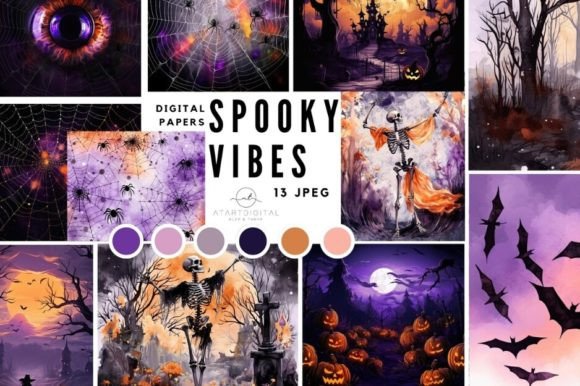
One of the most frequent mistakes creators make is assuming all digital papers are created equal. When you purchase the Halloween Digital Paper Pack, Witch, you are receiving a specific set of files with distinct characteristics. The pack includes 13 JPEG format files, each rendered at a high quality of 300 dpi with dimensions of 8”x 8”.
Why does this matter? Many beginners overlook the resolution requirement for print. If you intend to use these designs for printing on T-shirts, mugs, or fabrics, the 300 dpi standard is non-negotiable for crisp, professional results. Using lower-resolution images often leads to blurry edges and banding, which can ruin the aesthetic of your final product. Conversely, if you are designing for web and blog design, these high-resolution files provide ample room for cropping and resizing without losing clarity.
It is crucial to note that these files are NOT SEAMLESS. This is a significant detail that often catches users off guard. Seamless patterns tile infinitely without visible edges, making them ideal for full-page website backgrounds or large fabric prints. Since these papers are not seamless, they are best suited for contained areas such as planner covers, dashboard backgrounds, invitation cards, or art prints where the edges are defined or cropped. Attempting to tile them across a large surface will result in visible breaks in the pattern, disrupting the visual flow.
Avoiding Common Application Errors
Another area where creators stumble is in the scope of usage. The versatility of this pack allows for creating invitations, planner stickers, digital albums, and art posters. However, applying a witch-themed paper to a corporate newsletter or a minimalist blog might clash with the brand identity. Always consider the context. The whimsical and spooky elements designed by Tanya Kart are perfect for Halloween-specific projects but may require careful color balancing if used in broader autumn-themed designs.
Consider the example of a small business owner creating promotional materials. A common error is using the digital paper as the primary focus rather than a supporting element. For instance, when designing an invitation, the text must remain legible. If the background pattern is too busy, it can obscure important details. A better approach is to use opacity adjustments or overlay solid color blocks to ensure readability while still leveraging the thematic appeal of the witch-themed graphics.
For those using these assets in digital products like planners and dashboards, file management is key. Upon purchasing, you will receive one Zip file available for downloading. Failing to extract and organize these files immediately can lead to workflow bottlenecks. Create a dedicated folder for your seasonal assets, and consider renaming the files descriptively if the default names are generic. This simple step saves hours of searching when you are in the midst of a creative sprint.
Maximizing Value Across Different Mediums
The Halloween Digital Paper Pack, Witch shines when used across multiple mediums, but each requires a different preparation strategy.
- Print-on-Demand Products: When printing on T-shirts or mugs, ensure your design software is set to the correct color profile (usually CMYK for professional printing, though many POD services accept sRGB). Check the preview images carefully to gauge how the colors might translate to physical materials.
- Digital Planning: For planners and stickers, the 8”x 8” size is convenient but may need adjustment for standard A4 or Letter-sized pages. Use vector-based software or high-quality raster editors to scale the images proportionally. Since they are JPEGs, avoid excessive resizing which can introduce compression artifacts.
- Web Design: While not seamless, these images can still enhance web layouts. Use them as hero section backgrounds or card backgrounds where the image is contained within a specific div. Optimize the file size for web use to maintain fast loading times without sacrificing visual quality.
Educators and bloggers can also benefit from these assets by using them to create engaging headers or printable worksheets. The key is to maintain consistency. If you use one paper from the pack for a blog header, consider using a complementary color from the same palette for buttons or accents. This creates a cohesive look that enhances user experience and brand recognition.
What to Check Before You Buy
Before committing to any digital asset, including this pack, take a moment to review the preview images thoroughly. Tanya Kart provides previews that show all objects, allowing you to assess the style and color palette. Ask yourself: Does this fit my current project needs? Do I have the software to handle JPEG files effectively? Am I aware that these are not seamless?
Additionally, consider the licensing terms. While the pack is perfect for personal and commercial use in many contexts, always verify if there are restrictions on resale of the raw files. You can create and sell items like printed mugs or digital planners using these papers, but you typically cannot resell the JPEG files themselves as stock assets. Respecting intellectual property rights ensures a sustainable creative ecosystem.
If you have specific questions about compatibility or usage, do not hesitate to contact the designer. Clear communication can prevent misunderstandings and ensure you get the most out of your purchase. Remember, the goal is to enhance your creativity, not complicate it. By understanding the technical constraints and creative possibilities of the Halloween Digital Paper Pack, Witch, you can produce high-quality, professional results that stand out in a crowded market.
Ultimately, the value of this pack lies in its readiness. With 13 high-quality files at your disposal, you can skip the time-consuming process of creating backgrounds from scratch. Instead, focus on your unique design elements, knowing that the foundation is solid, stylish, and perfectly themed for the season. Whether you are a freelancer rushing to meet a deadline or a hobbyist crafting gifts for friends, this resource offers a reliable and efficient path to beautiful Halloween creations.